
Hey 'Scapers,
On Tuesday, April 7th we released two changes into the game that greatly improved performance for players. Both Frame Drops and Stuttering were significantly mitigated with these updates, but we have continued to monitor the performance of the game on an ongoing basis. Here's what we did:
- We addressed a problem that was causing unnecessary computing that ultimately led to stuttering issues. With the problem tackled, the stuttering issues have also been largely reduced.
- We changed the LODing behaviour of trees and grass, which solved the issue of consistent Frame Drops.
Today's topic is something a little different from our usual previews or feedback opportunities - it's an insight into the journey we went on to improve the performance of the game...
Since January we'd already been monitoring reports of RuneScape's performance - specifically from players noting that they were experiencing an increase in frame drops (FPS = Frames Per Second) and "micro-stutters" - that is to say that for some players, while travelling through Gielinor was manageable, it wasn't always very smooth. Hitches or performance slow-downs can impact both enjoyment and immersion, and we were keen to really dig into this matter. Today we wanted to share a little insight into what we've already changed in the game and what else we've been considering.
We'll try to keep this insight as approachable as possible, but we may need to occasionally refer to some more complex technical features.
The Problem defined:
- Frame Drops - often perceived as sluggish performance, especially when moving around quickly or surging/diving.
- Stuttering - often perceived as sudden or intermittent hitching/buffering.
Our initial approach
We noted an increase in performance related reports following our January 19th update, which had refreshed large parts of the Misthalin and Asgarnia areas in the game.
As this update improved the visual fidelity of a number of assets we naturally inferred that perhaps these changes had directly resulted in a performance impact.
To mention a few examples of how we reacted:
- Our art team tweaked and reduced the level of detail present in trees, glass window panes, chimney smoke, torchlight particle effects and grass.
However, as our investigation progressed in the weeks that followed and we continued to optimise some of these changes, we came to the realization that the performance degradation that we were observing wasn't necessarily caused by our January 19th changes... but that they very likely had made existing underlying issues more prevalent.
This didn't appear to be an issue that could be entirely fixed by an artist tweaking an in-game model, texture or reducing polygon counts. We needed to look at this on a more systematic level.
The good news we could draw from this finding is that if it's not necessarily improved graphical fidelity that caused the performance issues we were observing, and we should be able to continue with our plans to update other aspects of RuneScape in a similar way (though just to be safe, we'd still want to address any issues first).
The more tricky understanding was that if it isn't the graphical fidelity that is triggering these particular performance hitches... then what is?
What's in an investigation?
To get a clearer picture of what players were experiencing, we analysed performance data across millions of gameplay sessions that game clients sent us and captured FPS samples as players moved through the world.
We then mapped this data to thousands of unique locations and map tiles across Gielinor, allowing us to pinpoint where instability was most likely to occur and how it behaved in different environments. For example, how did the newly refreshed areas compare to other areas in the game such as Anachronia?
Crucially, we filtered out periods where the game was not in focus (for example, when players were tabbed out or active in another window). This was to ensure that we only measured real, active gameplay rather than background behaviour.
By combining performance data with player movement, location, and hardware context, we built a far more detailed and accurate understanding of how FPS instability manifests in the live game - we could see, on a data level, where exactly on the world map performance dropped or hardware demand spiked!
Whodunnit?
When looking at the FPS drops, our analysts noted that the issues could be observed across a range of hardware configurations - so the occurrence of these issues wasn't linked to whether a player had AMD or NVidia hardware, or even whether they had a potato PC or a time-bending rig. Similarly, issues were observed regardless of graphic settings levels, though their intensity or duration did increase with certain settings, particularly draw distance. While other settings like shadows and reflections do naturally impact performance, and are in turn affected by improvements to graphical fidelity, they weren't significantly affecting the stutters.
It consistently impacted both low and high end hardware, with the only difference being how long it took low end hardware to recover from the stutters. Meaning it was a consistent issue that could be reproduced and tracked, and very likely went beyond the updated assets.
This suggested that the issue was not solely driven by PC hardware limitations, but by an engine-level behaviour triggered under specific conditions such as scene updates or rendering complexity. Hardware still plays a role, but primarily in determining how severe these drops feel rather than whether they occur.
In short: when these events occurred, the engine experienced a temporary increase in rendering workload, which caused frame times to rise and FPS to drop proportionally from its normal level. Very low-spec machines could experience more severe effects, as their hardware has less headroom to absorb these spikes, causing performance to drop to much lower FPS levels during these events.
In conclusion, FPS instability was not caused by insufficient hardware performance, but by engine-level behaviour that produces intermittent spikes in rendering cost across all hardware tiers, with hardware determining how severely those spikes are experienced.
Is it badly optimized? Why don't you just equip more RAM!
This is often the go-to assumption in these scenarios, much like connectivity problems when a new game gets launched are often blamed on a "lack of servers".
Staying with the examples of servers for a moment (just because that's a little easier to understand), think about it this way: In a world where access to server-space is so prevalent, why do connectivity issues ("unable to login" or disconnects) still occur? Nowadays, servers operated by the world's largest businesses (Amazon - AWS, Google - Cloud Platform, Microsoft - Azure to name a few) can be scaled "up" (performance of the server is enhanced) and "out" (more servers are added) at the press of a button, yet connectivity issues can persist. The reason for this is not the lack of scaling capability, but deep-rooted architectural or "settings" level issues or bugs that are not enabling (or allowing) the hardware to run at its optimal state.
ELi5 (Explain Like I'm Five): Imagine you're driving a car on a dirt track and traffic is slow going. Beep beep! You wave a magic wand and improve the dirt track by turning it into asphalt. You're able to drive faster on this surface but the traffic jam doesn't seem to improve much. You wave your magic wand again and make the road a three-lane motor-way (high-way)! For the moment that the cars ahead spread out across the additional lanes things seem better... but then traffic grinds to a halt again.
What's going on you wonder? When you get to the front of the queue you realise: there are roadworks/has been an accident and all traffic has to pass through a single lane at this point of the road. It didn't matter how much you improved the road surface or how many lanes you magic'd up before this point, there was always going to be traffic jams as cars filtered through the single bottle-neck.
We need to apply that same line of thinking to game client performance. Performance impacts don't necessarily mean that the developers and artists aren't making conscious decisions to improve how the engine performs or that the hardware underpinning everything is too slow or weak. Rather, something somewhere in the system itself is making optimization work futile...
The Evidence at hand:
An engine-level bottleneck like the one above was what we'd been able to infer from the data available to us at the time, but we've not yet been able to directly measure this and identify a smoking gun.
One of the main reasons for this is that there are key areas of data that the client is not currently collecting, or not capturing in sufficient detail. This includes:
- FPS is sampled approximately every 10 seconds in most cases, with occasional longer gaps, which may miss very short-lived spikes (e.g., running from one spot to the next within those 10 seconds).
- Camera movement and scene transitions are not directly tracked.
- Engine-level telemetry is not currently collected (CPU/GPU frame time, draw calls, etc.).
With the above in mind, we'd only just started adding in the following data collection points into the client in order to narrow down the culprits:
- CPU vs GPU workload
- This helps identify whether performance is limited by CPU or GPU processing.
- Render pipeline behaviour
- This helps us understand how rendering work is being processed and where inefficiencies may occur.
- Scene update costs
- This helps quantify the performance impact of updating the game world during movement or camera changes.
While we weren't yet able to gather the necessary data above through telemetry, we were able to throw more and more JMod bodies at the investigation, and through the power of teamwork and friendship scouring every engine and performance nook and cranny we made two startling discoveries...
The LOD thickens (5x)
LOD is an acronym for "Level of Detail". It's a technical term to describe a process whereby objects that are further away from the player are displayed with much less detail than those right in-front of the player. As the player moves towards the object, the LOD increases and objects are rendered with more detail.
Here's an expertly rendered graphic of what that looks like in principle.
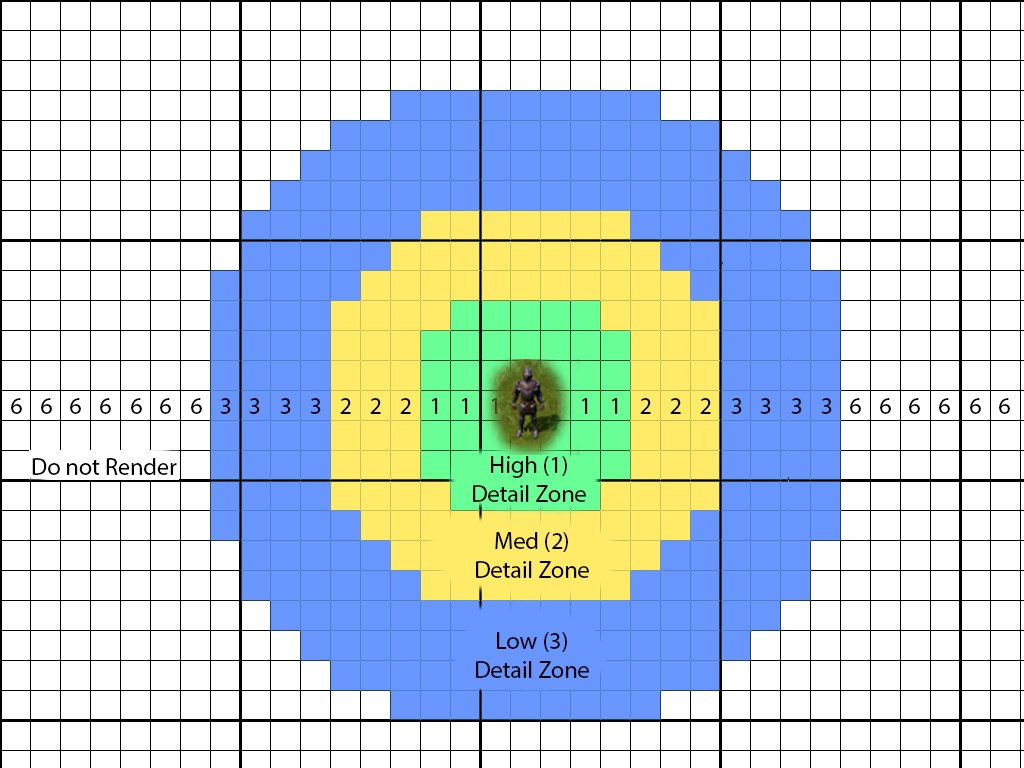
The theory makes sense: If the graphics card (GPU) needs to render EVERYTHING at the highest level of detail, it can easily become overwhelmed. If it only needs to render the things that are close by at high detail, while things in the background (that a player is never really going to focus on anyway) can be much lower in detail, then there are significant performance gains that can be made... right? RIGHT?
However, another very important aspect of LODing is that it is a system in and of itself, which requires computing power. This very system could actually cause performance degradation if it requires more resources to operate the LODing system than the resources that it is able to save.
If you're wondering how such a system could negatively impact performance, consider that it needs to continually keep track of every single visual object on screen and then change the LOD state of these objects (which also comes with a resource cost) depending on whether a player is moving towards or away from them.
Now that we've explained roughly how LODing can impact performance, here's the kicker:
It turned out that the grass that is everywhere in Gielinor had not one or two LODing states... It had five.
That's five levels of detail for every grass object in the game, which were constantly being cycled through as players moved through or past grass. The system was dropping frames because it was constantly being pushed to its limit by the need to keep changing the level of detail on each grass object in view... this could be especially exacerbated when players were moving very fast (Surge or Diving) because they were accelerating the LOD cycles due to their increased traversal speed.
It's unclear how grass ended up in this situation, especially since virtually no-one would be able to actually tell the difference between grass at LOD 1 vs LOD 5.
Changing the grass so that it only had two LOD states hugely improved the issue with frame drops and the drops we were tracking greatly diminished as soon as this change was made.
It's BEHIND YOU!
No really, it's STILL behind you.
In the same time period that we identified the Grass 5x LODing issue, our team continued to delve into the nature of the stuttering issue.
The LOD we referred to above relates to the level of detail, but the same system is used to determine View Distance. This is the point at which objects should even be considered for rendering and when their rendering should be ignored or discarded.
For example, while the game may render the far off structure of a building (and improve upon that detail as you get closer), the same system also determines that smaller individual objects like barrels, boxes or anything in that "smaller size object" realm, do not need to be displayed until the player passes a certain distance threshold towards them.
Let's return to our expertly rendered graphic from above.
The "6" zone does not relate to a level of detailing, it is simply a placeholder number used by the system to understand that anything in this zone should be ignored and not rendered. In short: If you can't see it, don't bother rendering it.
This process involves two steps. The first is the "Prioritization" and the second is the "Build" step.
During the Prioritization step, the world around you is classified into its LOD states, including a "Do Not Render" step.
During the "Build" step, in-game models are (re)generated and uploaded to the GPU according to the prioritizations received.
Here's where things went wrong.
As players continued to move through the world, a number of tiles behind them were not converting from the level 3 LOD (low) into the 6 state (do not render). The tiles were correctly deleted, but then being immediately recreated at level 3 LOD. And, since the tiles were beyond the maximum view distance, no-one could actually see it happening. This meant that as players continued to move, more and more excess load would pile up...
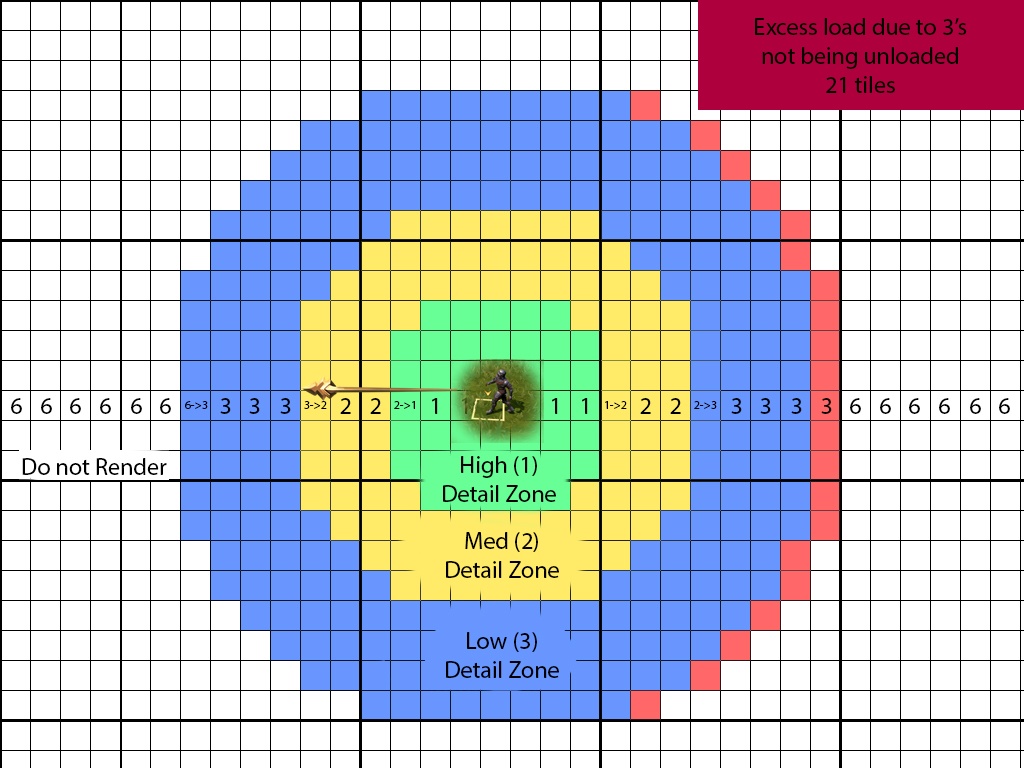
...and up....
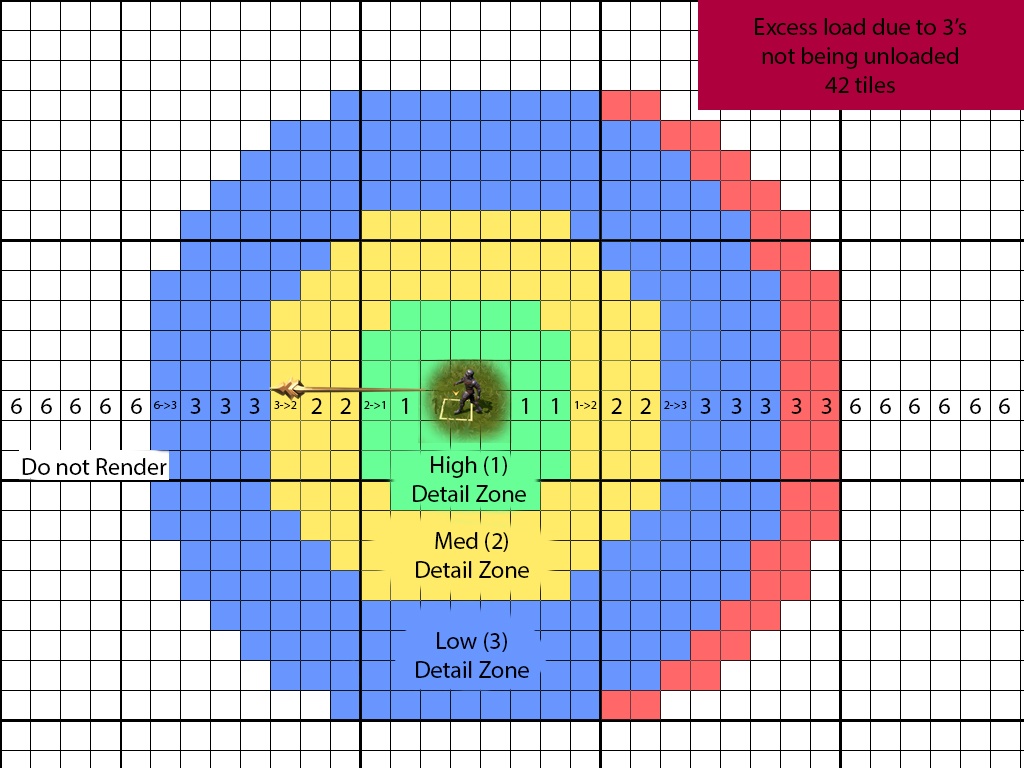
...and up.
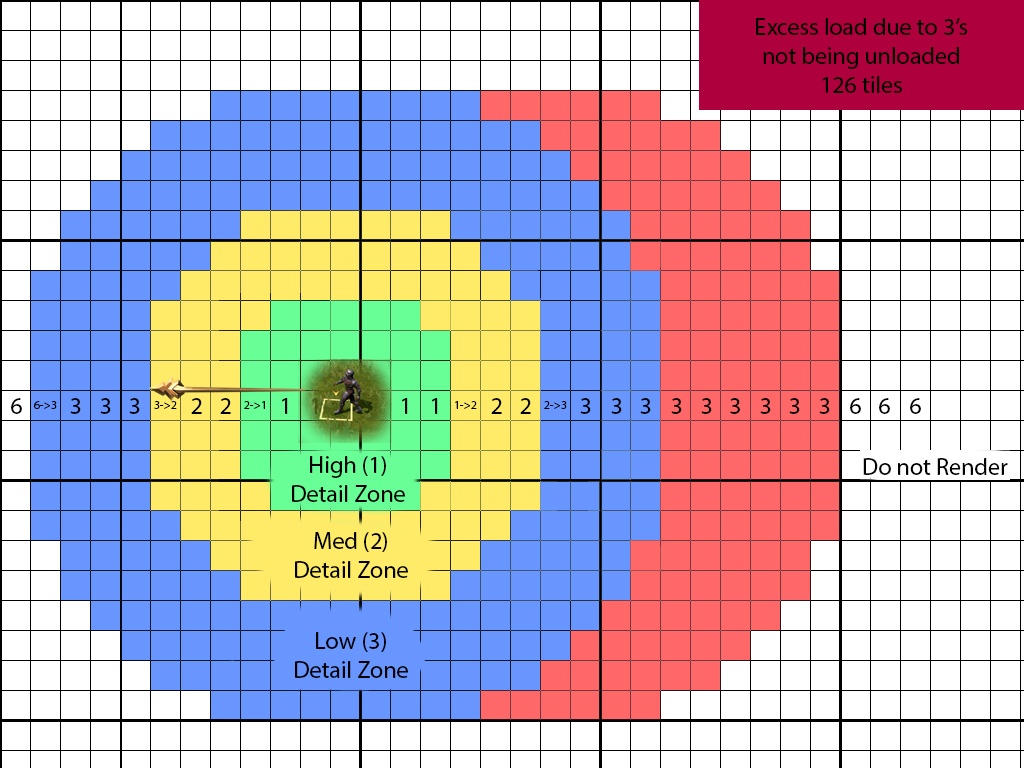
The reason this would not lead to a general memory-leak type failure is that each time the player entered a new map square (e.g. left Lumbridge and entered Draynor), the system would properly reload itself and discard the excess load. These map squares are indicated by the thicker black lines in our expertly rendered graphic.
While this failure to unload properly didn't continue to build into something truly catastrophic, it did nonetheless cause just enough load on hardware to trigger these micro-stutters, where the CPU had excess build tasks and the GPU had excess upload tasks (red tiles), even while new build and upload requests continued to be pulled in as per normal.
The fix for this was, in the end, a single line of code that a Jmod entered in the twilight hours of a Friday spent investigating.
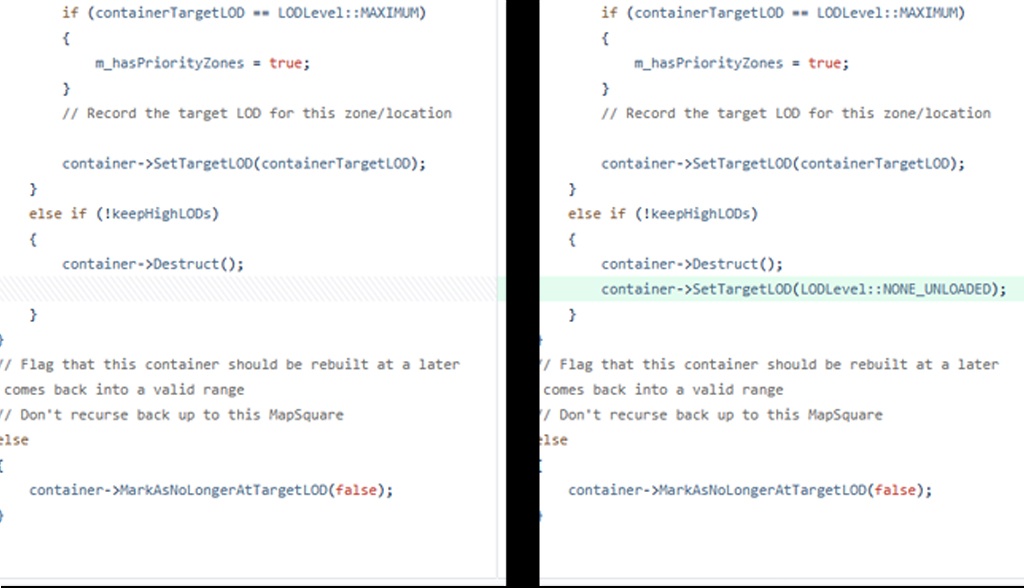
This single change virtually resolved the micro-stuttering issue in one fell swoop, and put us back onto the path of continuing to refresh and revamp the RuneScape we all know and love into the modern iteration it deserves to be.
The quest (for Ultra Settings) continues...
There is one remaining snag in this story. The settings that players not just choose, but that the game auto-suggests in some cases. Most notably here are the ULTRA settings.
Some years ago, the ULTRA and ULTRA+ settings in RuneScape's graphics settings were devised as a way to max out every single aspect of graphical rendering. While this work was carried out, however, the team was so preoccupied with whether or not it could, that it didn't stop to think if it should.
Yes, the ULTRA settings do make RuneScape look the best it possibly can... but these settings were not originally developed in the most optimized way for faster paced gameplay. Their ideal use case for their current implementation is for environmental appreciation or screenshots, rather than fast traversal or camera movements. Powerful rigs can run these settings just fine, but doing so is more demanding on the hardware than it needs to be, which also causes lesser powerful hardware to experience performance degradation to a stronger extent.
This issue is coupled with the fact that the settings Autosetup functionality currently suggests ULTRA settings to players whose hardware doesn't actually meet the requirements to make such a setting a smooth experience.
The reason for this is because Autosetup is calibrated based on our system requirements which are updated every so often based on hardware availability and new technologies. However, this calibration can lag behind the game's content at times, which makes it a moving and evolving target.
In some cases, features that were calibrated based on their previous impact don't necessarily reflect the reality today. One such example is ground decor, which was used much more sparsely in the past and so was considered to be a freebie. Nowadays it's used much more widely and can also impact other settings such as shadows.
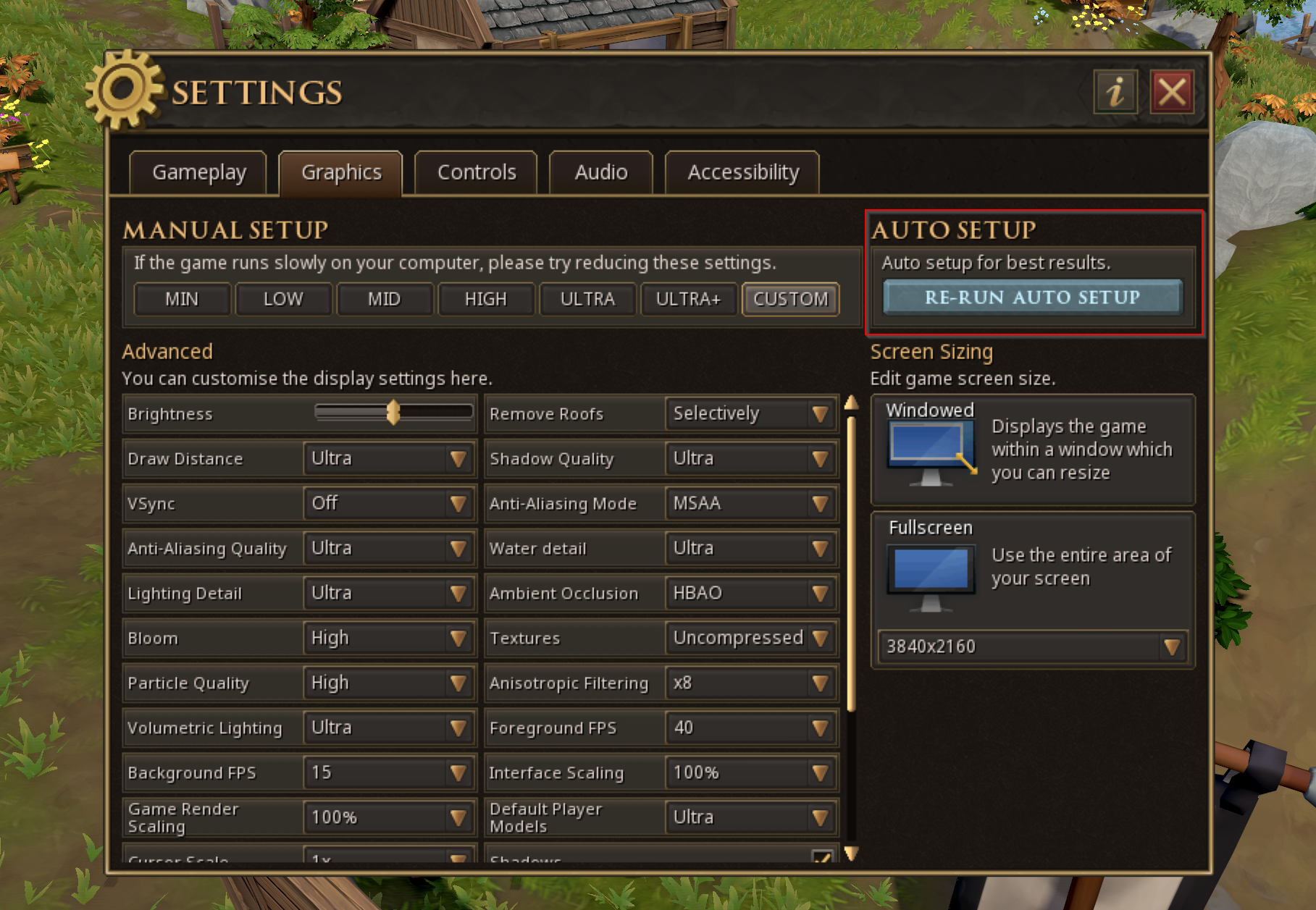
The Autosetup issue aside, let those who has never wilfully attempted to crank graphical settings to the maximum on a game they're playing cast the first stone. However, we are able to tell that players who are running the game on settings below ULTRA and on appropriate hardware are, in fact, not experiencing widespread performance issues.
To recap, there are two remaining issues at play here:
- ULTRA settings are not optimized as well or for the various gameplay options as such settings should be.
- The Autosetup feature is pushing some players into ULTRA settings even when their hardware dictates that they should really be a "high".
We have already embarked on the journey of addressing these, but completing this work will take a longer period of time as tackling them is the work of an overhaul rather than a tweak.
We believe that the worst performance frame drops and stuttering have been addressed at this point and we believe that many of the remaining performance problems observed in the game are not related to engine issues or unoptimized content development. Rather, they are caused by the in-game graphical settings system, specifically the ULTRA settings and the Autosetup feature.
If you are today still encountering performance related problems despite being on hardware that you believe should be sufficient, we would recommend stepping a graphical setting down for the time being if you prefer optimum performance over visual fidelity. In particular, we'd recommend experimenting with Shadows and Draw Distance settings for the largest impacts with regards to regaining frames.
Conclusion
That wraps things up for today - thank you so much for reading this far and we really hope this insight has been interesting to you! The technical performance of the game has significantly improved in the past few weeks thanks to the grass LODing and the unloading fixes described above. We do know that there still work to be done around improving how the settings options behave and perform, but we feel that the situation in-game is manageable for the time being.
Nonetheless, we will address them as we progress with our work which will also be continuing to improve our data gathering. We have also already made some improvements to our internal QA testing processes and we plan to develop those even further with more robust guidelines to work against.
Additionally, there are some larger engine changes in the works associated with a Vulkan client that'll enable us to make more targeted performance fixes in the future. All this work will continue to come together to support our overall dedication to making RuneScape the best it ever has been.
Epilogue: It Takes a Village
Or at the very least an entire team from various disciplines to come together to help identify, track, understand and brainstorm solutions for issues as complex as this.
With that being said we wanted to give a special mention (in no particular order) to Mods Alex, Soul, Easty, Socks, Volta, Camel, Lilith, Giragast, Iago, Keyser, Tri, Harker, Saj, Lordgit and a whole bunch of other JMods in the technology, engine and QA teams who haven't yet registered their official JMod names but who absolutely contributed to problem solving these issues.
Want to discuss this topic? Head on over to the Official Discord thread or Reddit and join the conversation!